워크스페이스 생성해서 들어가기
환경설정
마켓플레이스 >
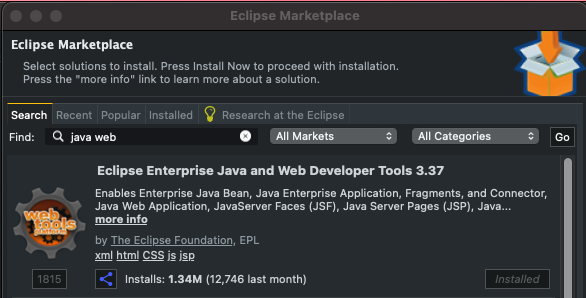

[언어셋]
프리퍼런스 > enc 검색 > 컨턴츠타입 > UTF-8
텍스트, 자바프로퍼티스, 스프링 프로퍼티스
스프링프로퍼티스 파일어소시에이션 add


얘네 다 확인
[업데이트]
체크해제

[xml]

모두체크
[자바버전]

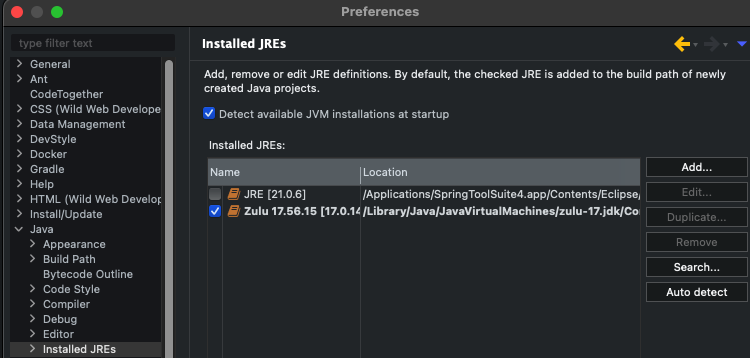

이거로 생성하기

환경설정 안해도 작동되는애들만 체크해봤다
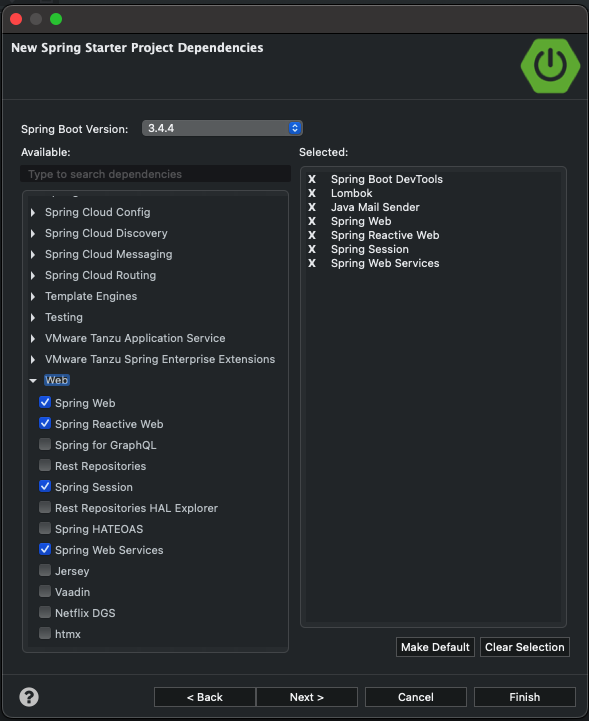
넥스트 삐니쉬 다 될때까지 냅두기

대시보드 돌려보고 에러나면 뭔가 단단히 잘못된거다
헬프 > 인스톨뉴소프트웨어 >
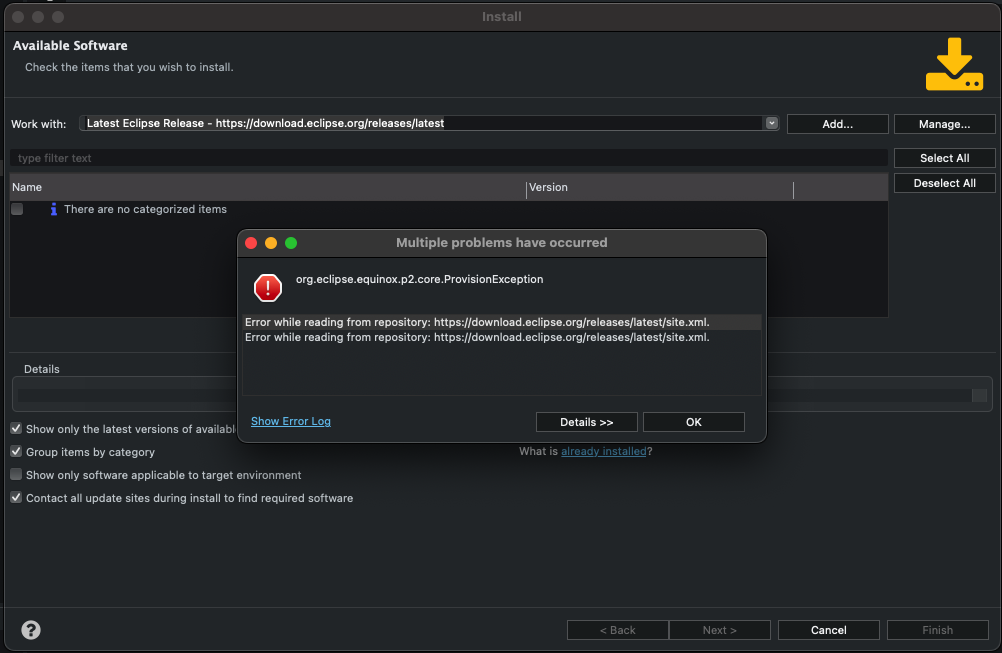
이거뜨면 다키스트다크 삭제하고 다시해보기 테마 삭제하니까 다시 됨
아래쪽 what is already installed 누르면 깔았던거 나옴
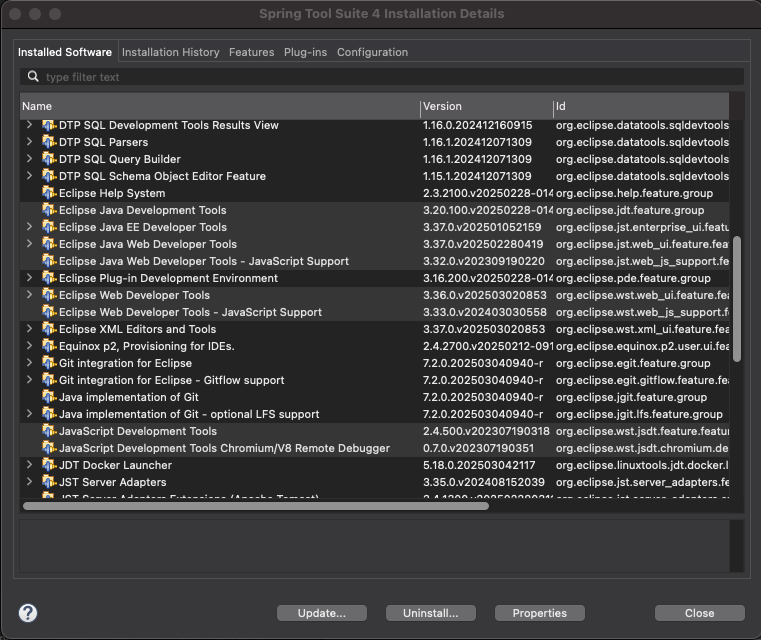
여기 선택된 애들 안깔려있으면 자스 자동완성이 안됨
그리고 뭐 새로 깔꺼면 항상 콘택트올업데이트 체크 해제하기!
html, js, jsp 파일 다 잘되나 확인
jsp 접속시 화면이뜨는게 아니라 jsp를 다운하게 되면
아래 따라하기
pom.xml에 추가해야함
mavenrepository들어가기
https://mvnrepository.com/artifact/jakarta.servlet.jsp.jstl/jakarta.servlet.jsp.jstl-api/3.0.2
디펜던시 복사해서 pom.xml에 넣기
버전 지우면 STS가 알아서 버전 맞춰줌
그리고 저 페이지 아래쪽
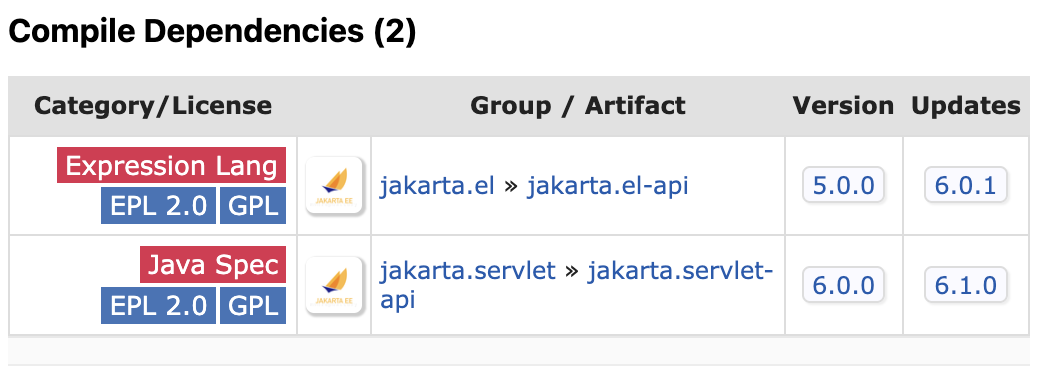
얘네도 버전빼서 넣기
https://mvnrepository.com/artifact/jakarta.servlet/jakarta.servlet-api/6.1.0
https://mvnrepository.com/artifact/org.glassfish.web/jakarta.servlet.jsp.jstl/3.0.1
https://mvnrepository.com/artifact/org.apache.tomcat.embed/tomcat-embed-jasper/11.0.6
html, js, jsp 정상작동 확인
컨트롤러 확인
작동X => 프로퍼티스 파일 세팅
spring.application.name=tv.site

#Server
#포트 8080말고 다른거 쓸때 설정
server.port=8080
spring.devtools.restart.enabled=true
server.servlet.encoding.charset=utf-8
server.servlet.encoding.force-response=true
server.servlet.encoding.enabled=true
server.servlet.encoding.force=true
새로운 프로퍼티스 파일을 만들어 appication.properties파일에 임포트하는 경우
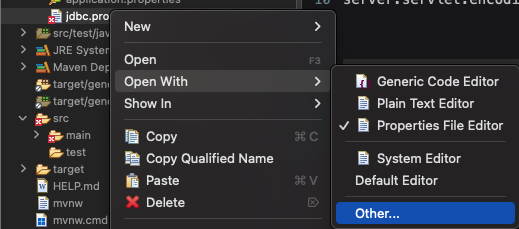
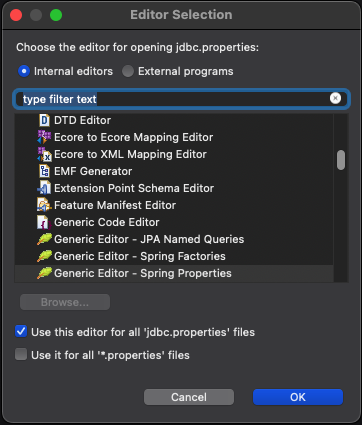
프로퍼티스 파일 새로 만드는 경우 file로 만들어서 openwith로 저거 하기
자동완성 가능, 나뭇잎 아이콘으로 변신
임포트 방법1 어플리케이션프로퍼티스파일에 추가
#다른 프로퍼티스 파일을 여러개 가져오는 경우
spring.config.import=jdbc.properties,io.properties
임포트 방법2 어플리케이션자바파일에 추가
package tv.site;

import org.springframework.boot.SpringApplication;
import org.springframework.boot.autoconfigure.SpringBootApplication;
import org.springframework.context.annotation.PropertySource;
import org.springframework.context.annotation.PropertySources;

@PropertySources({
	@PropertySource("classpath:/jdbc.properties"),
	@PropertySource("classpath:/io.properties")
})
@SpringBootApplication
public class Application {
	public static void main(String[] args) {
		SpringApplication.run(Application.class, args);
	}
}
파일 아이오
https://mvnrepository.com/artifact/commons-fileupload/commons-fileupload/1.5
네트워크 cdn
https://mvnrepository.com/artifact/commons-net/commons-net/3.11.1
okHttp (필수x 혹시나 모바일 할까봐, RestAPI떄문에 깖)
https://mvnrepository.com/artifact/com.squareup.okhttp3/okhttp/4.12.0
이 세개는 버전빼면 오류나서 그냥 넣음 그냥 지웠다가 다시하면 된다는 썰도
io.properties
#file I/O
spring.servlet.multipart.enabled=true
spring.servlet.multipart.max-file-size=100MB
spring.servlet.multipart.max-request-size=1000MB

#View (타임리프사용시 하나도 안써도됨)
spring.mvc.view.prefix=/
#spring.mvc.view.prefix=/WEB-INF/web/	실무에서는 이런식으로 씀
spring.mvc.view.suffix=.jsp
jdbc.properties
마이바티스 자동완성 안나오는 경우 pom.xml추가해줘야함
프로젝트우클릭 스프링스타터

마이바티스와 사용하는 디비드라이버 추가

pom.xml만 체크하기 //프로퍼티스체크하면 다날아감 조심
#Database
#spring.datasource.driver-class-name=~ 이렇게 사용하는 경우 여러개의 디비 사용 못함
#spring.first-datasource.driver-class-name=~ 이렇게 주루룩 쓰면 여러개 연결 가능

#DB 하나만 사용할 떄
#spring.datasource.driver-class-name=
#spring.datasource.url=
#spring.datasource.username=
#spring.datasource.password=

#노란줄 생기면 클릭해서 메타데이터 생성하면 됨
spring.first-datasource.driver-class-name=com.mysql.cj.jdbc.Driver
spring.first-datasource.url=""
spring.first-datasource.username=""
spring.first-datasource.password=""

spring.second-datasource.driver-class-name=""
spring.second-datasource.url=""
spring.second-datasource.username=""
spring.second-datasource.password=""

#mybatis
mybatis.type-aliases-package=tv.site
mybatis.mapper-locations=classpath:/*.xml
#mybatis.mapper-locations=classpath:/mapper/*.xml	폴더를 따로 만들어 설정하는 경우
노란줄 클릭해서 자동으로 만들어진 메타데이터
{"properties": [
  {
    "name": "spring.first-datasource.driver-class-name",
    "type": "java.lang.String",
    "description": "A description for 'spring.first-datasource.driver-class-name'"
  },
  {
    "name": "spring.first-datasource.url",
    "type": "java.lang.String",
    "description": "A description for 'spring.first-datasource.url'"
  },
  {
    "name": "spring.first-datasource.username",
    "type": "java.lang.String",
    "description": "A description for 'spring.first-datasource.username'"
  },
  {
    "name": "spring.first-datasource.password",
    "type": "java.lang.String",
    "description": "A description for 'spring.first-datasource.password'"
  },
  {
    "name": "spring.second-datasource.driver-class-name",
    "type": "java.lang.String",
    "description": "A description for 'spring.second-datasource.driver-class-name'"
  },
  {
    "name": "spring.second-datasource.url",
    "type": "java.lang.String",
    "description": "A description for 'spring.second-datasource.url'"
  },
  {
    "name": "spring.second-datasource.username",
    "type": "java.lang.String",
    "description": "A description for 'spring.second-datasource.username'"
  },
  {
    "name": "spring.second-datasource.password",
    "type": "java.lang.String",
    "description": "A description for 'spring.second-datasource.password'"
  }
]}